

Introduction
ChatGPT can assist small businesses in various ways.
Wearing many hats is often a part of the job when it comes to running a business. You’re writing a product description then you’re in reply to a customer complaint, then you’re supposed to be planning a marketing campaign. If this sounds familiar, then this post is for you.
Businesses can certainly make use of ChatGPT prompts here. When you’re faced with a blank screen and no idea where to begin, you can give ChatGPT a clear prompt and get a good starting point in a matter of seconds. ChatGPT won’t replace your judgment or your brand’s personality, but it can save you a lot of time on repetitive tasks.
We’ve compiled 25 ChatGPT prompts for small businesses based on the types of tasks you actually perform every day—writing, customer service, marketing, sales, planning, and daily admin. At the end you will also learn how to modify these prompts to achieve more personalized and better results.
1. How to Use These ChatGPT Prompts
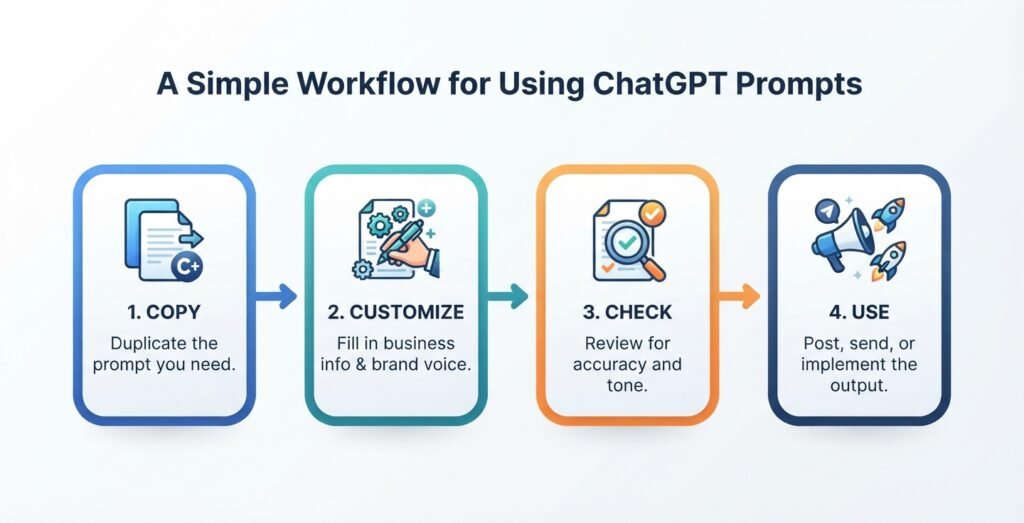
Let’s keep it simple before getting into the list. You don’t need any special skills to use these prompts; simply follow this sequence: Copy → Customize → Check → Use.
- Copy the prompt that is appropriate for your task.
- Fill it in with your business information—your product name, target audience, tone, and offer.
- Review the answer that ChatGPT provides. Read it carefully, correct anything that doesn’t sound like you, and make sure the facts are accurate.
- Use it—post it, send it, or add it to whatever you’re working on.
The final step, checking, is more important than people realize. ChatGPT is not a decision maker, it’s just a starting point. Use its output as a starting point from a helpful assistant, rather than treating it as a finished product ready to publish or sell.
2. ChatGPT Prompts for Writing and Content
Businesses can save a lot of time when creating content with ChatGPT prompts. Here are four prompts you can start using right away.
- Product descriptions: Create a sales pitch product description for [product name] explaining the product’s key features to [target customer] in a friendly and easy-to-read manner.
- Blog ideas: Brainstorm 10 blog post ideas for a business that sells [your product/service], focusing on topics that its customers would actually search for.
- Social media captions: Create 3 engaging Instagram captions for [product/offer], each including a clear call to action.
- Promotional messages: Write a promotional message that can be sent over WhatsApp or SMS announcing a discount/sale/offer on [product].
3. ChatGPT Prompts for Customer Service
Trust is built through good customer service. It’s tiring to write the same response repeatedly. These prompts can help you respond faster without sounding robotic.
- Customer replies: Write a helpful response to a customer asking about [shipping time/return policy/product availability].
- FAQs: List 10 frequently asked questions and their answers for a small business that sells [your product/service].
- Complaints: Write a professional reply to a dissatisfied customer complaining about [late delivery/damaged product]. Acknowledge the issue, take appropriate responsibility, and offer a practical solution.
- Polite follow‑ups: Write a polite follow-up message to a customer who didn’t respond to my previous message.
4. ChatGPT Prompts for Marketing
Marketing doesn’t necessarily require an agency. These ChatGPT prompts can help small businesses brainstorm ideas and create simple campaigns on their own.
- Marketing Ideas: Give 5 low-cost marketing ideas for a business that sells [product/service] to [target audience].
- Target audience: Describe the target audience for [product/service], including their common problems, interests, needs, and approximate age range.
- Promotional campaigns: Create a 1-week promotional campaign plan for [product/offer], including a post idea and key message for each day.
- Email marketing: Write a short promotional email about [new product/special offer/sale], with a clear subject line and call to action.
5. ChatGPT Prompts for Sales
Writing sales messages can be intimidating, especially when writing isn’t your strong suit. These prompts can help you communicate more clearly and confidently.
- Sales messages: Create a friendly sales message that introduces [product/service] to a potential new customer.
- Product benefits: List 5 benefits of [product/service] in simple, customer-friendly language, focusing on how each benefit helps the customer.
- Follow‑up messages: Write a friendly follow-up email to a customer who showed interest in [product] but didn’t make a purchase.
- Handling objections: Write a courteous reply to a customer who says [product] is too expensive. Explain its value without sounding defensive or pushy.
6. ChatGPT Prompts for Business Planning
ChatGPT can also be useful for organizing ideas and planning. The following prompts can help you structure your thoughts before making a business decision.
- Business ideas: Suggest 5 realistic small-business ideas that could be started with limited capital, based on my skills, interests, and experience.
- Simple business plans: Create a basic, easy-to-understand business plan outline for a business selling [product/service]. Include the target customer, value proposition, marketing approach, estimated costs, and revenue sources.
- Competitor research: Identify the key factors I should consider when researching competitors in the [your industry] field, and explain why each factor matters.
- Identifying customer needs: Identify 5 common problems customers face in [your industry] and explain how [product/service] could help address each problem.
7. ChatGPT Prompts for Daily Business Tasks
Not every business task is exciting. Many parts of running a business involve everyday administrative work. These prompts can help with some of those routine tasks.
- Meeting summaries: Summarize the following meeting notes into a short summary with action points: [paste your notes].
- Task lists: Convert this list of things to do into a prioritized and organized task list. [Insert your notes here.]
- Organizing information: Organize the following information into a table with clear headings: [paste your data].
- Writing emails: Write a short, professional email to [supplier/client/team member] about [topic], using a polite and clear tone.
- Quick decision support: Help me evaluate the pros and cons of [decision I am considering]. Present them in a clear bulleted list.
8. How to Get Better Results From ChatGPT
When trying to get better results from ChatGPT, there’s a simple prompt formula to keep in mind:
Here’s what each part means:
- Role: Tell ChatGPT what role you want it to take. For example: “Act as a marketing assistant for a skincare business.”
- Task: Clearly state what you want ChatGPT to do. For example: “Write a product description.”
- Context: Provide relevant background information. For example: “The product is a soap made with natural ingredients.”
- Requirements: State any rules or limitations. For example: “Keep it under 60 words and avoid technical language.”
- Desired format: Tell ChatGPT how you want the answer presented. For example: “Give me 3 bullet points and 3 options.”
A complete prompt using this formula might look like this:
Act as a Marketing Assistant for an Etsy store that sells natural soaps. Write a product description for a natural soap that is less than 60 words, no jargon, and three bullet points.
This formula can help make your prompts clearer and more useful for a wide range of tasks.
9. Common Mistakes to Avoid When Using ChatGPT for Business
Small details can make the difference between a prompt that works well and one that doesn’t.
- Being too vague: When you give ChatGPT a simple prompt such as “write something for my business,” it has very little context to work with. The more specific you are, the more useful the result is likely to be.
- Failing to include your brand voice: ChatGPT may produce a generic tone unless you give it guidance. Provide examples or describe the tone you want so the output sounds more like your business.
- Sending or posting without checking: Always review the response for accuracy, tone, and anything that doesn’t fit your business before using it.
- Using ChatGPT for financial or other sensitive information without checking: ChatGPT can help with drafting and organizing information, but important financial, legal, or business documents should be reviewed by a qualified professional when appropriate.
- Expecting the first response to be perfect. You may need to give ChatGPT one or two additional instructions, such as “make it shorter” or “make it friendlier,” to get the result you want.
FAQs
Q1 — Can I use ChatGPT for free for my small business?
Answer: Yes. ChatGPT’s free plan can handle many everyday tasks such as writing replies, captions, and emails. A paid plan may be useful if you need access to additional features, models, or higher usage limits.
Q2 — Is it safe to use ChatGPT for customer data or business information?
Answer: You should avoid pasting sensitive customer information, such as payment details, passwords, or private personal information, into ChatGPT unless you understand the relevant privacy and data-handling settings.
Q3 — Can ChatGPT create a full business plan for me?
Answer: It can create a useful outline or first draft covering basics such as goals, target audience, and strategy. However, it shouldn’t replace real market research or professional review when you’re raising funding or making major business decisions.
Q4 — What’s the best ChatGPT prompt for writing social media captions?
Answer: A good starting prompt is: “Write 3 short, engaging captions for [platform] about [product/offer], each including a clear call to action.”
Q5 — Can ChatGPT design images or logos for my business?
Answer: Text prompts can also be used with ChatGPT’s image-generation features when available, but creating a polished, usable logo may still require a dedicated design tool or professional designer.
Q6 — How do I make ChatGPT sound like my brand instead of generic?
Answer: Give it examples of your usual tone, or describe it directly — “friendly and casual” vs. “professional and formal.” ou can also provide an example of a past post or email as a style reference and ask it to follow that tone.
Q7 — Can ChatGPT handle customer complaints on its own?
Answer: It can draft a calm, professional response for you to review and send, but it shouldn’t be used to auto-reply to real customers without a human checking it first — tone and context matter too much in complaint situations.
Q8 — Is ChatGPT better than hiring a marketing freelancer?
Answer: It’s better viewed as a time-saving tool rather than a complete replacement for a marketing freelancer. ChatGPT is great for quick drafts, brainstorming, and first passes, but a freelancer brings strategy, brand judgment, and experience that AI prompts alone can’t fully replace.
Q9 — Does ChatGPT know details about my specific business automatically?
Answer: No, it starts with no knowledge of your business unless you tell it. That’s why giving context — your product, audience, and goals — in every prompt makes a big difference in the quality of the response.
Q10 — Can small businesses use the same ChatGPT prompts every day, or do they need to change often?
Answer: You can reuse the same core prompts over time—just update the details such as the product, offer, season, or audience. The prompt structure itself rarely needs to change unless your business needs shift.
Final Thoughts
ChatGPT isn’t going to manage your business for you, but it can lighten the load when it comes to writing-heavy and repetitive tasks. Whether you’re writing a product description, responding to a customer, or developing a quick marketing idea, a set of ready-to-use ChatGPT prompts means you don’t always have to start from scratch.
However, the secret to making ChatGPT work is how to use it. Give it context and always check what it produces before sharing or using it. Used this way, ChatGPT can become a practical and low-cost tool in your small business toolbox.
CTA
You don’t need to be a tech expert or a marketing pro to start using ChatGPT in your business — you just need to get started. Whether you’re a complete beginner running your first small store, or a freelancer juggling client work solo, these prompts are designed to help you save time from day one.
Pick two or three that match what you’re working on this week, tweak them to fit your brand, and see what comes back.
And here’s the thing — every business is different, so chances are you’ll come up with a prompt tweak, a use case, or even a mistake-to-avoid that isn’t covered here. Share it in the comments below. Found a prompt that worked really well for your niche? Struggled with something and figured out a fix? Share it — this list becomes more useful for everyone as more real experiences are added.
If this post helped you save even 10 minutes today, share it with another small business owner or freelancer who is still writing everything from scratch. And if you’re new here, stick around — Knoexa is all about making AI tools simple for people just getting started, one guide at a time.