

Introduction
Have you ever felt like there aren’t enough hours in the day? Whether you’re studying for exams, managing work deadlines, or handling daily responsibilities, staying productive can be challenging. That’s where ChatGPT can help. It acts as a smart AI assistant that helps you learn faster, work more efficiently, and organize everyday tasks with ease.
Whether you are a student, a professional, or simply someone who wants to get organized, this guide shows you how to use ChatGPT for studying, working, and managing everyday tasks.
1. Utilizing ChatGPT for Student Work
Success in school isn’t just about working harder—it’s also about working smarter. ChatGPT can become your personal study assistant, helping you understand difficult topics, prepare for exams, and manage your learning more efficiently.
- Understand Complex Concepts: Understand Complex Concepts: Need help with a textbook passage? Ask ChatGPT to explain it in simple terms.
- Use ChatGPT to improve your memory with active recall: Tell ChatGPT that you are preparing for an exam on a specific topic, and ask it to create a practice quiz to test your knowledge.
- Efficient Summarization: If you are working through several research papers, you can ask ChatGPT to summarize them and highlight the key points.

2. Working with ChatGPT at Work
For professionals, time is one of the most valuable resources. ChatGPT can automate repetitive tasks, improve productivity, and help you focus on higher-value work.

- Turn Meeting Notes into Action: You can provide a meeting transcript or notes to ChatGPT and ask it to create a clear summary, identify key decisions, and organize action items.
- Take Your Data Analysis to the Next Level: If you have a spreadsheet, you can upload it to ChatGPT and ask it to identify patterns, summarize the data, or help you explore specific questions.
- Easier Project Planning: Getting started on a project can be difficult. ChatGPT can help you create a project timeline, break the work into manageable steps, and identify key milestones.
3. Applications in everyday life
Using ChatGPT for study, work and daily life is not limited to the work or classroom setting.
- Writing emails: Don’t overthink your emails. You can have ChatGPT write a professional email.
- Learning skills: If you are learning to code, or learning to cook, you can ask ChatGPT to provide you with a learning plan.
- Daily planning: If you are feeling overwhelmed you can give ChatGPT your to-do list. Give it instructions to schedule them in a sensible way.
- Brainstorming Ideas: If you’re stuck for ideas, ChatGPT can help you brainstorm possibilities and explore different approaches.
- Language learning: Language Learning: In addition to language-learning apps, you can use ChatGPT to practice conversations, vocabulary, grammar, and writing.
- Travel planning: You can ask ChatGPT to help create a travel itinerary based on your destination, interests, budget, and available time.
- Meal Planning: Streamline your weekly routine by using ChatGPT to generate personalized meal plans, grocery lists, and quick, healthy recipe ideas.
- Budget Planning: Leverage ChatGPT to create personalized budget plans, track your monthly expenses, and receive tailored advice for reaching financial goals.
If you’re considering whether you need the free version or ChatGPT Plus, our ChatGPT Free vs Plus guide explains the differences and helps you decide which plan fits your needs.

Top Productivity Tips
- Turn on Voice Mode: Use voice mode to brainstorm or organize your thoughts while walking or doing other hands-free activities. Avoid interacting with AI while driving unless it can be done safely and legally without distraction.
- Rewrite for Better Results: The first answer is not always the best one. Ask ChatGPT to make the response more concise, detailed, informal, professional, or better suited to your needs.
- Create a Custom GPT: If you regularly perform the same type of task, a custom GPT can help you follow a consistent structure and workflow.
- Save Your Best Prompts: Keep a document of prompts that consistently produce great results so you can reuse them later.

4. Important mistakes to avoid
Knowing when to rely on AI—and when to use your own judgment—is crucial when using these tools.
- The Hallucination Trap: ChatGPT may sound confident even when providing incorrect information. Always review important facts, figures, quotations, and claims before relying on them.
- Protect Your Privacy: NEVER share data or confidential information about your company with ChatGPT.
- Maintain Your Voice: If you use ChatGPT to draft content, always review and edit it. AI-generated text can sound generic, so add your own experience, judgment, and voice.
- Beyond the Prompt: Don’t rely on AI without thinking critically. Always review and personalize important work before submitting or sharing it.
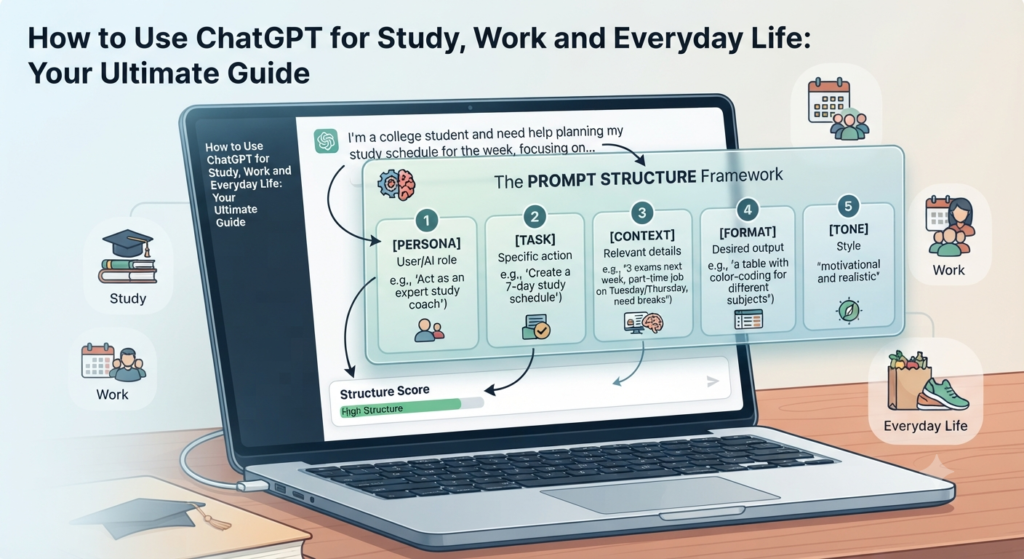
5. Mastering Prompts: The Pro Formula
The quality of the response often depends on the quality of your prompt. Use this simple formula to create clearer and more successful outcomes:
- Persona + Context + Task + Constraint + Format
- Given that you are a Nutritionist and I am a parent with only 20 minutes to cook, make a 3-day meal plan for my family of 5 people which must not exceed $10 per meal and includes vegetarian options, presented in Table form.
FAQs
1. Is there a limit to the number of times you can use ChatGPT?
Answer: Yes. ChatGPT usage limits can vary depending on the plan, model, and current usage limits. The Free plan provides access to ChatGPT with basic limits, while paid plans provide higher limits and additional features.
2. Will ChatGPT be a replacement for a human tutor or professional advisor?
Answer: While ChatGPT is a useful tool for brainstorming and developing ideas, it does not possess human intuition, lived experience, and expertise that can be applied in the real world, which is where a professional tutor or subject-matter expert comes in.
3. Does ChatGPT give you accurate up-to-date information?
Answer: ChatGPT can be useful for drafting and analysis, but always double-check important information, particularly for legal, medical, financial, or academic purposes.
4. How would schools or employers know if I use ChatGPT?
Answer: Some schools and employers use AI-detection tools, but these tools are not foolproof and can produce inaccurate results. Follow your institution’s AI-use policies and make sure your work reflects your own understanding and contribution.
5. Can we trust ChatGPT to share our sensitive information?
Answer: Do NOT enter confidential work documents, passwords, financial information, or sensitive personal information into ChatGPT. Check your ChatGPT privacy and data-control settings to understand how your conversations are handled and whether you can control their use for model improvement.
6. How do I get the best results from ChatGPT?
Answer: Be specific. Follow the Persona + Context + Task + Constraint + Format model. The better you can describe and specify your prompt, the more specific and helpful your answer will be.
7. Can ChatGPT help with academic writing?
Answer: ChatGPT can be useful for brainstorming, outlining, and improving grammar or sentence structure. However, you should follow your school’s academic-integrity policies and avoid using AI to complete work that you are expected to do yourself.
8. What can ChatGPT NOT do?
Answer: ChatGPT has limitations. When web search is available, it can look for current information and provide sources, but its answers can still contain mistakes. Important information should always be verified.
9. Will ChatGPT take the place of my job or creative role?
Answer: It is better to think of ChatGPT as a way to enhance your workflow. It can take care of routine tasks, such as summarizing emails or creating simple templates, allowing you to concentrate on higher-level creativity and decision-making that AI cannot.
10. What can I do to avoid sounding like a robot in my writing?
Answer: When using AI for generating text, always check it and edit it. Personalize the content with your own examples and tone, and remove repetitive or unnatural AI-style phrases so the writing sounds more authentic.
11. Is ChatGPT free to use?
Answer: ChatGPT has a Free plan, while paid plans provide higher limits and access to additional features. Available features and limits can change over time.
12. How can I be sure that the information is correct?
Answer: It’s essential to confirm it. AI is not a replacement for critical thinking, particularly when dealing with legal, medical, or financial matters and is merely a tool for drafting and brainstorming.
13. For professional coding is it possible to use it?
Answer: Absolutely. ChatGPT can help with boilerplate code, debugging, explanations, and learning programming concepts. However, always review and test the final code, especially for security, reliability, and performance.
Conclusion
ChatGPT is one of the most powerful productivity tools available today. Whether you’re a student, professional, freelancer, or simply looking to save time, learning how to use ChatGPT effectively can make everyday tasks easier. The key is to use it as a helpful assistant—not as a replacement for your own thinking, creativity, or judgment.
Call, to Action
Ready to save time with ChatGPT? Choose one task you’ve been putting off and try using ChatGPT to help you complete it. Then share your experience in the comments—we’d love to hear how you’re using ChatGPT in your study, work, or everyday life.