

Ever type in a quick question to ChatGPT, Claude or Copilot and receive a response that was very robotic or just very plain boring? You are not alone. Many people consider AI to be a search engine. They type in a couple of random words into the box and pray. AI is not Google. It doesn’t only look for web pages that already correspond to your keywords. It does not instead aim to comprehend your intent and create new things from scratch. Where you give a lazy question, you will get a vague lazy answer.
Writing prompts is the greatest super ability of today. Saves you hours of frustration, reduces revisions and provides you with the right answers, essays, code or ideas the first time around. This is a guide for writing effective prompts in simple English. Does not require any technical know-how or coding skills. Easy practical steps to make you an AI-prompting pro today.
1. Introduction
Have you ever asked ChatGPT a question and received a boring or completely irrelevant answer? You’re not alone. Most beginners think AI works like a search engine. It doesn’t. Learn What Is AI? The quality of your results depends largely on the quality of your prompt. Many beginners struggle to write effective prompts and get the most out of these tools. Once you’re an expert at engineering, you no longer have to fight with the AI, you work with it. If you want to write a blog post, analyze a spreadsheet or learn a language, it is easier when you know how to structure your instructions. Let’s take a look at how these systems operate so that you can begin to get results straight away. If you’re deciding whether the free version of ChatGPT is enough for your needs, or whether Plus is worth paying for, see our ChatGPT Free vs Plus comparison.
2. What Is an AI Prompt?
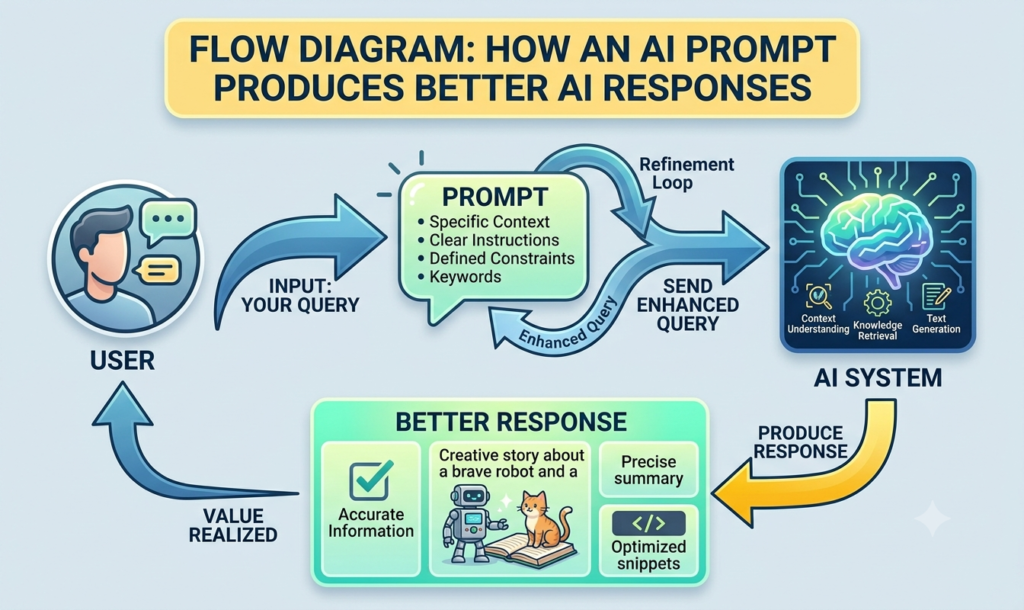
At its core an AI prompt is the set of instructions, text or questions you type into an artificial intelligence tool to tell it what you want it to do. Learn What Is Generative AI? Consider it a text-to-a-smart-but-literal bot. A prompt is the starting line that you give to the AI. When you say things to it, it reads your words, checks the patterns that it had learned in the training and guesses the most likely continuation of words. This is a significant drawback because the AI will only produce what you tell it to produce: the quality of what you give it is the quality you will get back. When you give a very short prompt, the AI may have to guess your context, tone, length, and ultimate goal. Knowing how to write a well detailed and well-structured prompt completely eliminates the guess work.
3. Why Good Prompts Matter
Why is it important to learn how to write prompts? Can’t you just keep trying until the AI eventually gets it right? Learn How to use ChatGPT for Beginners. You could, It wastes a tremendous amount of time. There are a number of reasons why writing prompts alter the way you interact with technology:
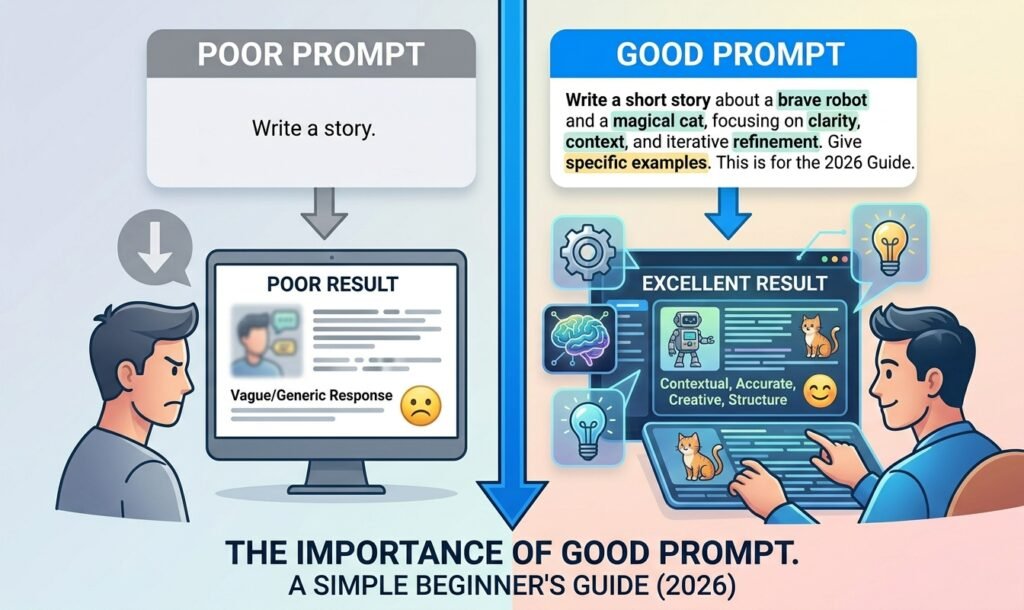
- What you actually want: You don’t get the same essay that you’d find in a textbook but you are given content in your own voice, aimed at your target audience and for your specific goals.
- It saves you a lot of time: If you have a great prompt, you have 90% of the way there the first time. A poor prompt will result in a life of typing five times “no not like that” consecutively.
- It activates possibilities: the AI models are very intelligent but they are passive. Don’t ask them to do anything, unless it is nicely constrained and clearly directed.
- It boosts your productivity: Sitting down with a new marketing initiative, sending an email, coding an app, or summarizing a lengthy research paper –any of these can be done in seconds instead of hours with the help of a prompt.
4. Elements of a Great Prompt
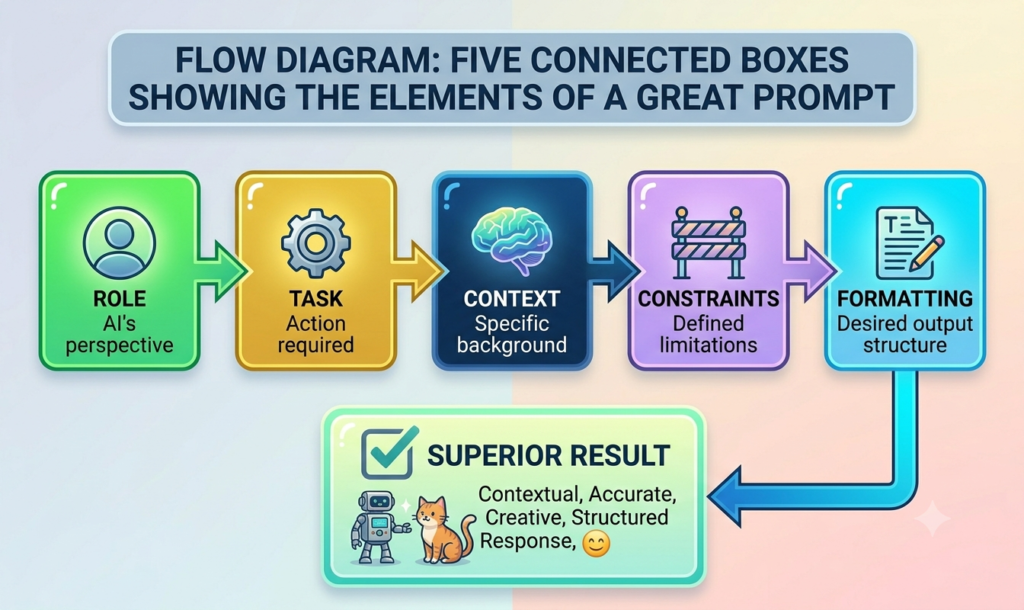
While you do not have to write a novel for every conversation with an AI, there are some key components that make the best prompts. As you sit down to think about prompts, make sure to include as many of the following as you can:
- The Role: Describe the AI’s persona to it. Having a role provides the AI with a different lens to view through. For example, telling the AI to act as a ” digital marketer” will get you vastly different results than telling it to act as a “high school career counsellor.”
- The Task: Your task is to be as straightforward as you can. Use an action verb as the beginning of your prompt such as write, summarize, analyze, brainstorm, calculate, translate. State the goal in the beginning.
- The Context: Provide the AI with context. For whom is this content? What is the issue you’re attempting to tackle? What is the purpose of your writing? The more specific and concise your background information, the more focused and relevant the AI’s focus will be.
- Constraints: Make boundaries. Explain to the AI the length of the response, the tone of voice to maintain, what not to mention, and what words or phrases the AI should include in the response.
- Formatting: Avoid a block of text. State which way you would like the information to be presented: You can request a list, a markdown table, a block of code and even a professional email template.
5. Prompt Formula for Beginners
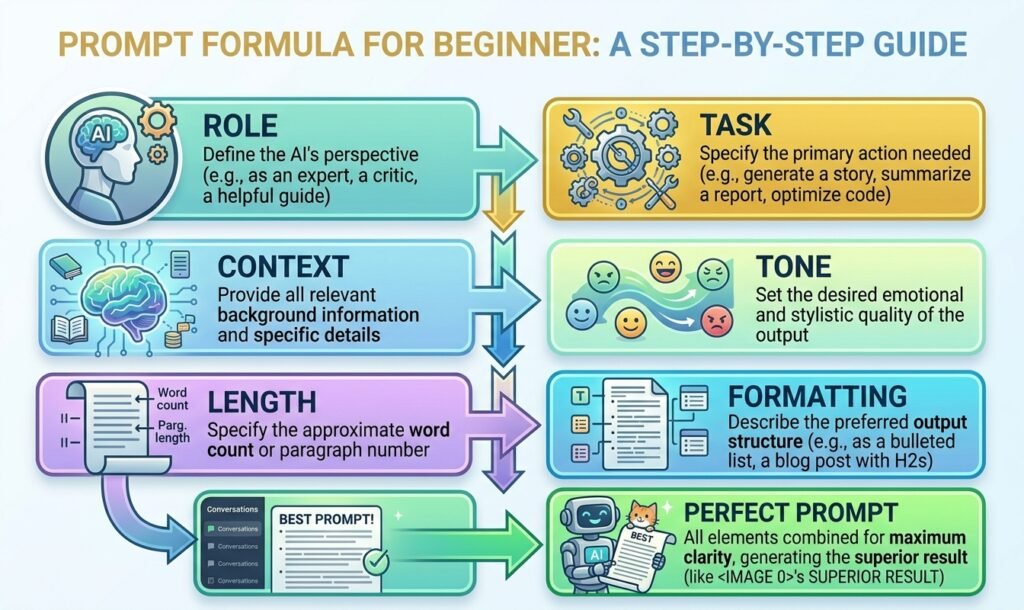
This is a simple formula beginners can use to create clearer and more effective prompts.
It can be daunting when you’re new to the game and trying to remember everything. To make it easy use this plug-and-play formula. You can. Copy and paste this structure into any AI tool and learn how to write better prompts with the click of a button:
“Be a [Role] and do [Task] for [Context] using a tone of [Tone] and a length of [Length] and in the form of [Formatting].”
Let’s take a look at this in action:
Help your client begin a workout regimen by offering a realistic yet positive program for a client who is a busy office worker, has no gym equipment, and only has 30 minutes a day.
How much better is it to say “Give me a workout routine” than to say that? You’ve given the AI boundaries, a specific identity and an exact format to follow.
6. Poor Prompt vs Good Prompt (Comparison Table)
Let’s take a look at some lazy prompts and compare them to optimized high-performing prompts to see the difference.
| Goal | Poor Prompt (What most people write) | Good Prompt (What gets results) |
| Write an Email | Write an email to my boss to request a day off | Work as a corporate employee. In a brief e-mail, write to my manager requesting next Friday off because of a personal reason. Say that my current projects are current and if there are any emergencies, I’ll look at my e-mail from time to time. Limit to less than 150 words. |
| Cooking Dinner | Please, give me a chicken recipe for Dinner. | Act as a home chef. For a healthy dinner, what is the recipe for chicken breast, broccoli and soy sauce? I want something easy to prepare, in only a 1 pan and under 30 minutes. Use a shopping list and then step-by-step instructions. |
| Studying a Topic | Describe what a cryptocurrency is | Act as a high school teacher. Describe what cryptocurrency is to a complete novice. Relate to an analogy to make it easier to understand. Try to avoid technical terms, and limit it to 300 words. |
| Social Media | To create a LinkedIn post about productivity | Become a thought leader for productivity and remote working. Create an interesting LinkedIn post in the context of the fact that breaks can help you focus more! For every attention grabber, include 3 bulleted actionable tips that will get comments, and close with a question. Maintain a relaxed but business-like atmosphere. |
7. 15 Practical Prompt Examples
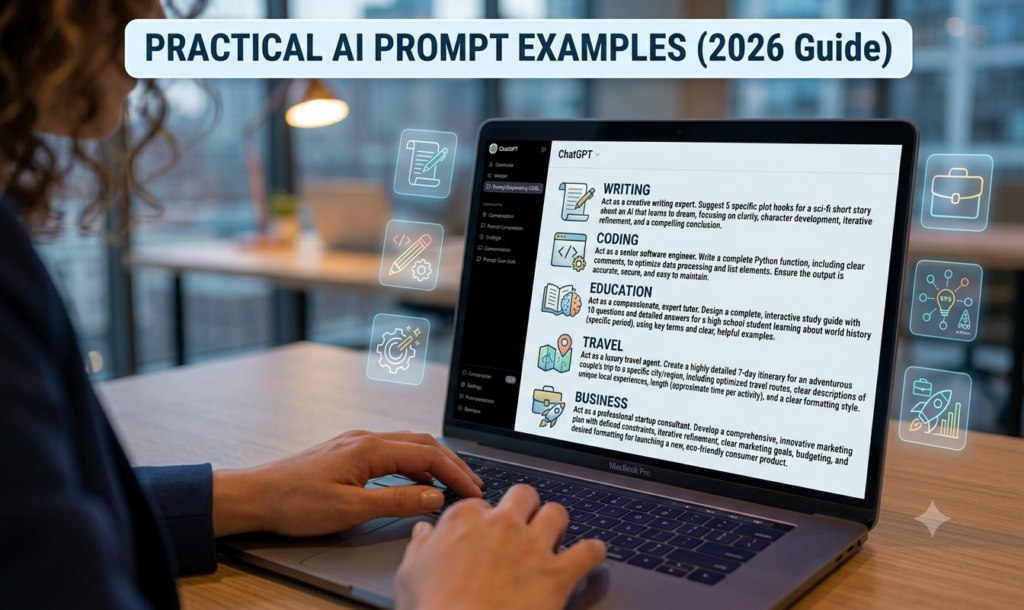
Let’s look at 15 actionable examples of prompts you can use immediately to develop better prompts and start getting better AI answers.
Content Creation & Writing
- Blog Brainstorming: Be a Content Strategist. Brainstorm 10 blog post ideas for freelancers who work remotely to be productive. List it as a numbered list.
- Social Media Captions: Become a media manager. Create 3 captions on Instagram for your new eco-friendly water bottle. One shall be funny one one educational. Include hashtags.
- Be an email marketer: Write a newsletter for an integrated urban agriculture program. Share 3 tips to help reduce pest infestation during the summer. Use a tone.
Learning & Education
- The Feynman Technique: Tell me about quantum computing in the style of I’m 10. Make an analogy and be brief.
- Book Summaries: Be a critic. Write a summary of the book Atomic Habits by James Clear. Use bullet points to summarize the 5 key takeaways.
- Language Practice: Do the job of a Spanish teacher. Have a conversation with me about my hobbies. Use beginner Spanish, ask me 1 question at a time, correct my Spanish grammar, if I make a mistake.
Career & Professional
- Resume Polishing: Be a leading Recruitment Consultant. A bullet point from my resume will be pasted. Rewrite it to be impactful, action-oriented and with a focus on measurable outcomes.
- Interview Prep: Be a hiring manager for a software engineering position. Smile at me and ask me 5 behavioral interview questions, one at a time. First listen to my answers to each question before asking the next one; then give feedback at the end on my answers.
- Negotiation Script: Be a Career Coach. Write me a letter to take to my boss asking for a 10% raise due to my performance this year. Maintain a confident, courteous and business-like tone.
Everyday Life & Productivity
- Meal Planning: Be a nutritionist. Develop a 3 day “recipes on a budget” meal plan for a vegetarian who wants to have a high protein meal plan. Include breakfast, lunch and dinner. Present it in tabular form.
- Travel Itinerary: Be a Tokyo Tour Guide. Plan a 4-day trip for somebody who has no experience in Japan and enjoys street food, anime and historical shrines. Assign groups to neighbourhoods to reduce travelling time.
- Gift Ideas: Recommend 5 gifts for a 30-year-old male that enjoys camping, craft beer and sci-fi fiction books that cost less than $50.
Technical & Coding
- Code Explainer: Be a software developer. Write an explanation of this particular Python script in English. Explain each line of code in a step-by-step manner for someone who is new to coding.
- Excel Formulas: Work as a data analyst. Create a formula in Excel that will find a value in column A on a sheet named Inventory and give back the corresponding price in column C.
- Debugging Help: Be a code debugger. Explain why this JavaScript code is producing an error and correct the code.
8. Common Prompt Mistakes
It can be easy to get a few bad habits when trying to learn how to write prompts. Keep an eye out for these frequent mistakes:
- Being overly polite: The AI does not need to be told “please,” “thank you,” and “if you don’t mind,” but it won’t do him/her any good either. The AI is not a person, it’s just taking in input tokens. Save on typing energy, and concentrate on clear, succinct instructions.
- The information dump: Avoid writing a long unstructured text containing five different tasks. By the time the AI reads to the end, it’s likely that it has forgotten the first two tasks. For complex projects, divide it into a series of steps.
- Vague adjectives: These are words such as good, interesting, or amazing words, which are not the same meaning to everyone. Rather than requesting that the student produce a “good essay,” request the student to produce an “essay supported by recent data, in active voice, with brief paragraphs.
- Assumption that AI can read your mind: The AI is not someone who reads your mind. Express your desire for a short answer. If you have to tell it from your own point of view, let them know who you are. Don’t leave out the essentials.
9. Pro Tips
Looking to up your game to the highest level? Use these simple pro tips to always have a better understanding of how to write better prompts:
- Provide a few examples (Few-Shot Prompting) The simplest way to get the desired style and/or format is to demonstrate the style or format to the AI. To use it to write newsletters in your own voice, copy an old newsletter you have written and type “Analyze the style and tone of this example, and write a new one on [Topic] using the same style and tone.”
- Share your information with the AI for it to ask questions If you’re not sure of the details to put in a prompt, change your perspective. At the end of your prompt, add the following: “If you need any more information or context to give the best possible output, please ask me 3-5 questions before I give you my answer.
- Think Step-by-Step If you are using math, logic, coding or complex decision making, use magic words: “Let’s think step-by-step. For complex tasks, asking the AI to work through the problem carefully can help produce a more structured and useful answer.
- Tweak and Iterate Don’t consider the first ask to be the final ask. Think of using the AI as a conversation partner. If the response is too formal, respond, “Make it more casual. If it was missing an important point, reply by saying “Good, add a section about [Point]”.

10. Final Verdict
It’s not about learning a secret programming language or being a tech genius to learn how to write better prompts. Basically, it’s about communicating clearly, setting expectations and adding a bit of structure.
The simple addition of Defining a Role, Task, Context, and Format raises your AI tool from a novelty parlor trick to a powerful hyper-efficient digital assistant.
Next time you launch an AI chat window, instead of throwing in some random words, you should take a moment to think about what you actually want from it. Breathe, apply the formula, put it in perspective, and the AI suddenly becomes very smart. Happy prompting!
FAQs
1. The key component of a prompt is what?
Answer: The challenge is the tough part! Before anything else, the AI should have an idea of what you want it to do.
2. Does being polite to AI change the output quality?
Answer: It does not change the way AI functions and the need for politeness is just a courtesy to the AI. It only acts as a data processor to your text.
3. What to do about a vague AI response?
Answer: Provide the limits for the AI. Explain the desired length of the response, tone of voice and specific details or keywords to provide or omit.
4. What is a role in AI prompting?
Answer: A role is the command given to the AI that makes it sound like it’s an expert, whether it’s a top-tier digital marketer or a high-school teacher. This allows the AI to formulate the wording and point of view of the response.
5. Why did the AI provide me incorrect information?
Answer: AI models guess what are the best words, so they can make up false facts. To minimize this, you can give context or instruct the AI to reason step-by-step.
6. What is the beginner formula for writing a prompt?
Answer: The most basic model to adhere to is: Role + Task + Context + Constraints + Formatting. All these added together guarantee you an accurate result on the first attempt, from the AI.
7. How long should an AI prompt be?
Answer: It’s not a one-size-fits-all solution. Generally, it should be as long, as necessary to provide clear instructions and context. A good prompt is long enough to provide the boundaries and information, but not too long that it gets off topic. Avoid blocks of text containing several tasks within them.
8. What is ‘few-shot prompting’?
Answer: Few-shot prompting is the technique where you provide the intelligence one or two examples of the exact style, tone or format you’re looking for, and then request that it create its own response based on them. That is how you’ll reap the rewards of the artificial intelligence and get accurate outputs.
Answer: Yes, it can. You can. Simply copy and paste some text you’ve written into the AI tool and then instruct it to analyze your tone, how you organize your sentences, and your style. Then, you can instruct it to generate material in your unique tone.
9. Is the AI capable of writing in my voice?
10. How can I make the artificial intelligence give its answer in a tabular format?
Answer: You can just append an instruction onto your prompt at the end like: “Present the final output as a markdown table with clear columns, for X and Y.
Call-to-Action (CTA)
What’s the best prompt you’ve ever used? Share it in the comments, and let’s learn from each other. If this guide helped you, bookmark it and come back whenever you need to write better AI prompts.